

 PostGIS in Action
About the Authors
Consulting
PostGIS in Action
About the Authors
Consulting
Friday, January 18. 2008Setting up PgAgent and Doing Scheduled BackupsPrinter FriendlyWhat is PgAgent?PgAgent is a basic scheduling agent that comes packaged with PgAdmin III (since pre-8.0 or so) and that can be managed by PgAdmin III. PgAdmin III is the database administration tool that comes packaged with PostgreSQL. For those familiar with unix/linux cronjobs and crontab structure, PgAgent's scheduling structure should look very familiar. For those familiar with using Microsoft SQL Server Scheduling Agent or Windows Scheduling Tasks, but not used to crontab structure, the PgAdmin III Job Agent interface to PgAgent should look very welcoming, but the schedule tab may look a little unfamiliar. PgAgent can run both PostgreSQL stored functions and sql statements as well as OS shell commands and batch tasks. Why use PgAgent over other agents such as cronjob, Microsoft Windows Scheduled Tasks, or Microsoft SQL Server Agent?For one thing, since PgAgent runs off of standard Postgres tables, you can probably more easily programmatically change jobs from it from within PostgreSQL sql calls that insert right into the respective PgAgent pga_job, pga_jobstep, pga_jobagent, pga_schedule tables to roll your own App integrated scheduler. Compared to CronTab, PgAgent has the following advantages:
Compared to Windows Scheduled Tasks - PgAgent has the following advantages:
Some missing features in PgAgent which would be nice to see in later versions would be some sort of notification system similar to what SQL Server Agent has that can notify you by email when things fail and a maintenance wizard type complement tool similar to what SQL Server 2005 Maintenace Wizard provides that allows users to walk thru a set of steps to build automated backup/DB Maintenance tasks. This is a bit tricky since it would need to be cross-platform. Granted the job history display in PgAdmin that provides success and time taken to perform task is a nice touch and makes up for some of this lack and you can always roll your own by running some monitor to check the job event logs. How to install PgAgentNote the docs describe how to install PgAgent: http://www.pgadmin.org/docs/1.8/pgagent-install.html, but the example to install it in a db called PgAdmin seems to send people off in the wrong direction. We shall highlight the areas where people most commonly screw up in installation, but for master reference, refer to the official PgAgent install docs listed above. While you can install PgAgent in any database, to our knowledge, you can only administer it via PgAdmin III if it is installed in the maintenance database which is usually the database called postgres. For ISPs, having the ability to install it in any db and rolling your own agent interface may be a useful feature. Other note that is not explicitly stated, but is useful to know: PgAgent need not be installed on the same Server/Computer as your PostgreSQL server. It just needs to have the pgAgent files, which you can get by installing PgAdmin III or copying over the necessary files. PgAgent service/daemon also needs necessary access to the PostgreSQL database housing the job tables. If you are using it to backup databases to a remote server, the account it runs under will also need network file access or ftp access to the remote server. You can also have multiple PgAgent's running on different servers that use the same schedule tables. To install PgAgent, there are basically three steps
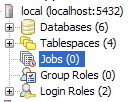
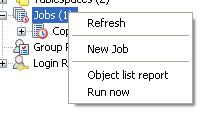
Once you have PgAgent installed, and open/refresh PgAdmin III, you should see another section called Jobs that looks like below: Creating Backup JobsCreating backup jobs is done with a shell script of some sort. In Windows this can be done with a .bat file and specifying the file in the PgAgent job or by writing the command directly in the PgAgent job. In Linux/Unix - this is done with a .sh file and specifying that in the PgAgent job or writing the command directly in the PgAgent job. Generally we go with a .bat or .sh file, because using a shell script allows you more granular control - such as backing up multiple databases or having a separately date named file for each daily backup. Below is a sample batch script for Windows that backs up selected databases and then does a full Pg_dumpall as well
Below is an equivalent Linux/Unix backup shell script
Save the respective above scripts in a (dailybackup.bat for windows pgagent) or (dailybackup.sh for Linux/Unix pgagent) file. For bash unix scripts make sure it has unix line breaks (not windows) - you may use dos2unix available on most linux/unix boxes to convert windows line breaks to unix linebreaks. When saving as .sh make sure to give the .sh file execute rights using chmod on linux/unix. Also change the db1, db2 and add additional lines for other databases you wish to backup to the respective names of your databases and add additional as needed. 771 permissions gives execute rights to public and all rights (read,write,execute) to owner and group. Alternatively you could do 640 instead which would remove all rights from public, but then you will need to do a Change owner chown to change ownership to account you are running PgAgent under. Note the above script and commands we tested on a CentOS box so commands and script may vary if you are running on MacOSX or another Linux variant. A couple of notes about the above which are more preferences than anything.
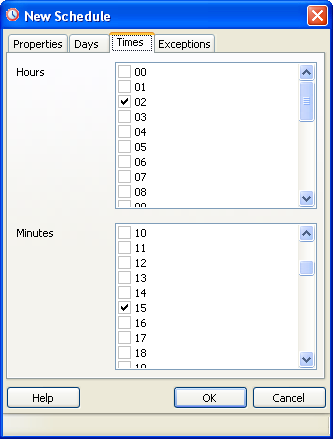
Next to create the PgAgent backup job follow the following steps. Once the job is saved, the hierarchy in PgAgmin looks like the below snapshots 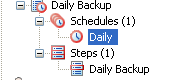
Clicking on the Daily Schedule Icon 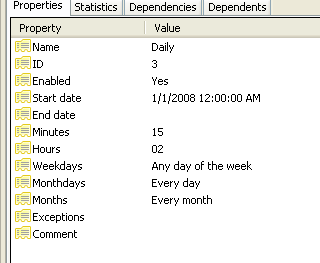
Clicking on the respective objects in the Job Hierarchy such as a Step or schedule gives you detailed information about each of those. The statistics tab gives you details such as how long a step took, whether or not it succeeded or failed and when it was run. Keep in mind that while PgAgent is closely related to PostgreSQL and uses PostgreSQL for scheduling and logging, there isn't any reason you can not use it as an all-purpose scheduling agent. In fact we use it to backup MySQL as well as PostgreSQL databases, do automated web crawls, download remote backups etc. Using the SQL Job Type option, you can use it to run postgresql functions that rebuild materialized views, do other standard postgresql specific sql maintenance tasks, etc. On top of that PgAdmin provides a nice interface to it that you can use on any computer (not just the one running PgAgent). Comments
Display comments as
(Linear | Threaded)
This seems a really cool addition to PgAdmin III. Congratulations and thank you!
Very good post.
I just missed some information about setting up the daily backup job with the local authorization set to password on Windows. Passing the password to pgAgent with password=**** is not sufficient (and not save), as pg_dump requires a password too! This is not easy to detect, as pgAgent just waits for infinity. So setting the password in %APPDATA%\postgresql\pgpass.conf finally solved the issue.Now my db will get its daily backup :) Thank you.
How to config pgpass.conf and what is it's content?
I use PostgreSQL 8.1 so i dun see that file? Can you help me?
Each line is a separate connection option something like
localhost:5432:*:postgres:passwordhere Its documented here for 8.1 http://www.postgresql.org/docs/8.1/interactive/libpq-pgpass.html
Thx so much!! I Can handle it now! :-)
But up to now, i can't run this batch with pgAgent, actually i did as this post :-(. So i dun know why it dun work! I use it with Windows Schedule and Linux Crontab --> it's ok :-)
in the Linux script in this topic, when you want to backup more or less database/schema you must reedit the script, it's so inconvenient. I find out the way easier to manage what you backup. I hope it will be usefull. See my Script:
#!/bin/bash #backup directory can be a file server share that the PgAgent daemon account has access to BACKUPDIR="/any/where/you/want" PGHOST="127.0.1.1" PGUSER="postgres" PGBIN="/where/your/pg/is/bin" thedate=`date --date="today" +%Y%m%d%H` themonth=`date --date="today" +%Y%m` # Logging the day you backup echo -e "\n\n\t\t`date --date="today" +%Y-%m-%d`\n" >> $BACKUPDIR/backup_log.log # Read data from list file note that ur list file contain many line. Each line have format : #database1|schema1 #database2|schema2 #btw if you want to separate by other symbols, you must remember to change the symbol at the IFS below. ^_^ #then backup data while read line do echo $line > temp_line while IFS='|' read db sch do $PGBIN/pg_dump -i -h $PGHOST -U $PGUSER -n $sch > $BACKUPDIR/$sch-$thedate.dump $db echo "`date --date="today" +%H:%M` Dump schema $sch in database $db of host $PGHOST" >> $BACKUPDIR/backup_log.log #done done < temp_line done < list.txt # delete temp file rm -f temp_line #this section deletes the previous month of same day backup except for the full server backup rm -f $BACKUPDIR/*`date --date="-2 day" +%Y%m%d`*.dump exit 0
Help!.
I did every thing you say and still can't run any job. Untill de job is shown in the panel, when I press "Run Now" nothing happens. Here is what I did: 1- create plpgsql languaje. 2- Run the script to create the schema 3- set the password in the user profile 4- install de agent services. 5- go to pgadmin 6- create new job as is shown 7- press "run now" 8- get confused when nothing happens. I have postgrres 8.3 in windows PC Thanks four your help. Regards, Miguel Maneiro
Miguel,
Did you verify to make sure the PostgreSQL Agent service is running in windows services. Sometimes it installs, but doesn't start. If the service isn't started, then clicking run in PgAdmin III won't do anything. The other possibility is that the postgres account the service is running under has no access or your .pgpass file does not exist or is invalid. To get around all of that - the simplest way is to allow localhost access without password (which on a box you control and only you or admins log into is fairly safe) You can set this by unremarking out the line (e.g. get rid of the #) next to the line that reads host all all 127.0.0.1/32 trust (or adding it if it doesn't exist) you can also do it via PgAdmin III by 1) click on server 2) Tools->Server Configuration -> pg_hba.conf and putting a check box on that line or adding a line like that. (note that you may not see this option if you do not have the adminpack.sql installed which is normally located in Program files\PostgreSQL\contrib\adminpack.sql (just run in postgres db) Hope that helps, Regina
Just in case if somebody is wondering why the Linux script doesn't work as it is - typos!
$PGBIN/pg_dumpall -h $PGHOST -U $PGUSER | gzip > $BACKUP_DIR/fullbackup-$themonth.sql.gz should be $PGBIN/pg_dumpall -h $PGHOST -U $PGUSER | gzip > $BACKUPDIR/fullbackup-$themonth.sql.gz $PGBIN/pg_dump -i -h $PG_HOST -U $PGUSER -F c -b -v -f $BACKUPDIR/$db-$thedate.compressed $db should be $PGBIN/pg_dump -i -h $PGHOST -U $PGUSER -F c -b -v -f $BACKUPDIR/$db-$thedate.compressed $db
Here is yet another script solution, using Python. I have this on a Windows machine tucked on a server. I just need to double-click it when I think it is a good time to do a backup (typically once in the morning and once in the afternoon).
#!/usr/bin/env python import os from datetime import date # Customize these: backupdir = r'\\Nas1\Documents\MyDB\backup' host = '192.168.123.248' dbname = 'mydb' user = raw_input('Username>') dateStr = date.today().isoformat() ver = 'a' while True: name = 'MyDB_'+dateStr+ver+'.backup' fullpath = os.path.join(backupdir,name) if ver == 'z': raise Exception, 'Possible file names a-z have been used!' elif os.path.isfile(fullpath): ver = chr(ord(ver)+1) # increment letter else: # file does not exist, go ahead and use it break cmd = 'pg_dump --ignore-version --host=%s --username=%s --format=c --blobs --verbose --file="%s" %s'%\ (host, user, fullpath, dbname) print 'cmd:', cmd res = os.system(cmd) print 'done:', res raw_input() # pause at end for people that double-click the script
Host - Windows XP SP2
PostgreSQL 8.2.9 PgAgent is installed and running as service Problem - in PGAdminIII, i setup the job as listed and when i right-click on jobs, there's no Run Now. i only get Refresh, New Job, and Object List Report.
able to configure everything and able to get a file in the specified output directory also. but the file size shows as 0kb and in statistis section of pgAgent job in pgAdmin III status shows as Successful.
Any suggestions?
Postgresql 8.3
I have installed successfully pgAgent and able to see the jobs--> Scheduler, Steps and created new job and scheduled for daily routine maintenance, but it is not working. i am trying to execute the sql commands in one of database pgAgent is runned as postgres user (i also tried with machine user no luck) any idea or suggestions job details shown as Last results Unknown Running at Not currently running
Thanx Leo for sharing such a wonderful tutorial for Setting up PgAgent and Doing Scheduled Backups...It's working perfectly for me.. :)
Have a Great Day....
HI,
Is pgAgent really meant to run on "postgres" database?? If not, why is that when I select other database on which the step will run, it says, "Couldn't connect to the database!", but when i select the postgres database, it is running smoothly. If pgAgent can run in other database, can you teach me how can i do that? Thanks, Ged
if you are using windows, and the host name is localhost then be sure to use localhost in pgpass and not 127.0.0.1. or just use both.
127.0.0.1:2032:*:user:password localhost:2032:*:user:password
Hi,
I have the script and it works when I run it through terminal. The script is under owner 'administrator' and the folders I backup also belong to 'administrator'. When I try to run it through PgAgent then nothing happen. Which user should own the script and the folders?? Should I chown it to user 'postgres' ? I tried that but still nothing runs. Thanks.
Depends what account you have the PgAgent service running under. For our purposes we setup a separate account with admin rights so we wouldn't have to worry about that stuff and have the service running under that account. That also allows us have it write the backups to our network file server.
which server are you running? I've had some stupid issues with Windows 2008 R2, though can't recall how I overcame them.
I've done the same steps as in the article. My job finished succesfully but dunp were not created. What I am doing wrong?
Eten,
Which platform are you running on? Unfortuantely the pgagent success for non-sql jobs is not ahtat trustworthy (or at least not on windows anyway). But you can usually see the log results which often shows the error that happened. First you want to make sure whatever script you have runs fine as is. Standalone. If it does, then you want ot make sure the account your have pgAgent running under can also run the process. That is suually the probelm that the pgAgent daemon (/service) account doesn't ahve enough rights to run your batch job.
Thanks so much , this post help me to resolve my inconvenients of automatic backup's and work perfecly
You wrote: "In practice we also like to have at least one of the backups ftped to a remote location and include that as part of the script ...".
It would have been very interesting to see how you did this with pgagent on your CentOS test box, because I have some trouble getting both ftp and sftp performing a set of commands I try to feed them with, by several different mechanisms. Ftp/sftp do transfer the files when I run the script manually, but not by pgagent. I suspect it might have something to do with user or env settings, but have not found the solution yet.
I just installed pgAgent 3.0 on MS Win Server 2008 using pgAdmin 1.14.1 following the above to do batch jobs, and the only gotcha I had was that pgAgent kept failing to actually run the batch file.
By running pgAgent in DEBUG mode at the command prompt, I saw the batch file pgAgent was trying to run was not my batch file as per above, but a temp created batch file. After putting the above code directly into the definition, instead of using batch file path and filename, the job ran perfectly.
Paul,
Great. Come to think of it I think I've always run the scripts for windows by pasting the script directly in the batch window. For Unix/Linux I usually do the same too, though I think on linux I have done with path to file without issues. Maybe that's why I assumed it would work on windows as well.
I spoke to soon, and didn't do my "due diligence". I don't want to lead anyone down the wrong path. pgAgent ran while in debug mode from command prompt, but not in service mode. Also, I was able to run the batch file in debug mode. It just needed an extra "\" for the path:
set BACKUPDIR="C:\pgjobs\backup\\". This is odd, because PostgreSQL runs as the same user as pgAgent with no problem. |
Entry's LinksQuicksearchCalendar
Categories
SubscribeBlog Administration |
|||||||||||||||||||||||||||||||||||||||||||||||||
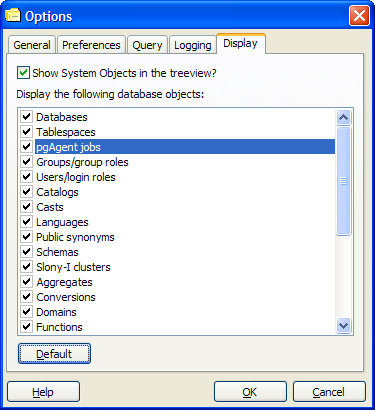
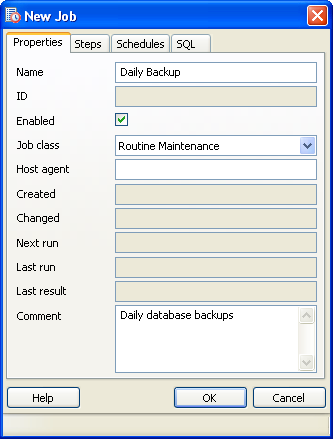
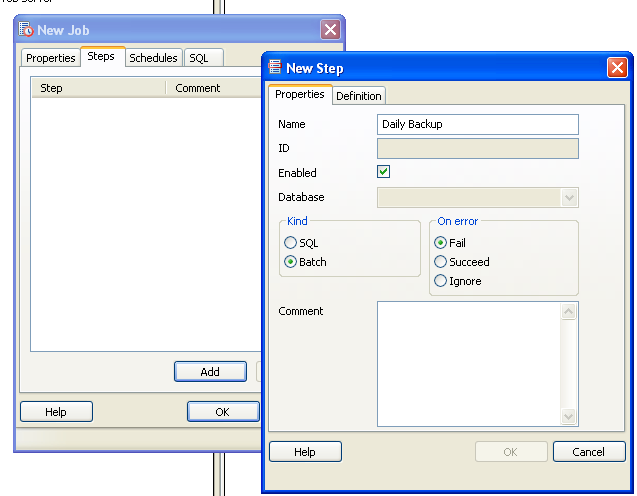
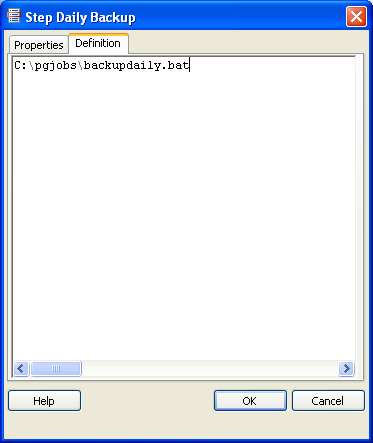 and then click the OK button.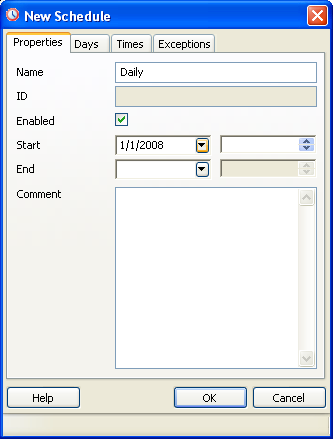


Tracked: Jul 15, 04:36
Tracked: Apr 26, 07:31