

 PostGIS in Action
About the Authors
Consulting
PostGIS in Action
About the Authors
Consulting
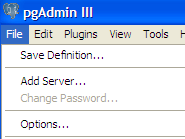
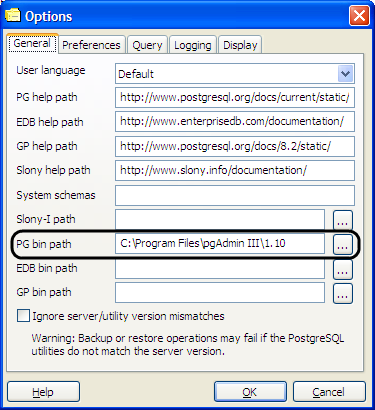
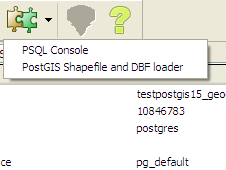
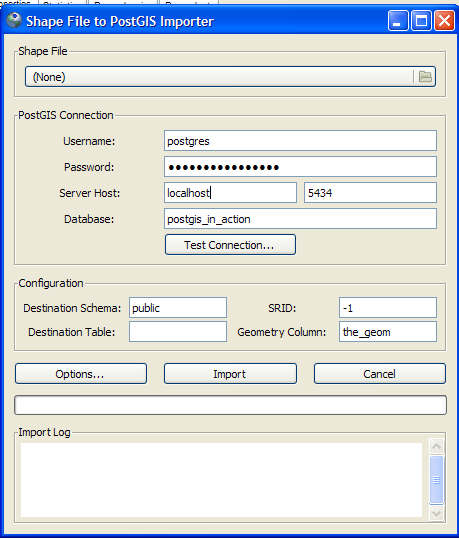
Thursday, December 24. 2009PgAdmin III Plug-in Registration: PostGIS Shapefile and DBF LoaderPrinter FriendlyRecommended Books: PostGIS In Action PostgreSQL 8.4 Official The SQL Language PostgreSQL 8.4 Server Administration PgAdmin 1.9+ has a simple Plug-In architecture which makes it relatively simple to introduce new plugins. It is pretty much all controlled by the file plugins.ini. In that file you can register any executable you want in there. If you want the executable to get passed database configuration settings, there is an option for that and you just have to build your executable to accept commandline switches. You can download the windows version from http://postgis.net/windows_downloads. If you just want it without the PostGIS 1.5 binaries -- just download the one labeled PostGIS ESRI Shapefile GUI. To enable said plugin, do the following:
Comments
Display comments as
(Linear | Threaded)
I have installed the gui, but keep getting errors when I try to load a shapefile. Below is an example:
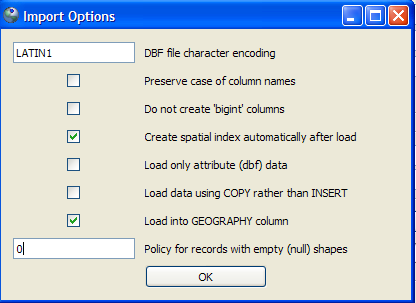
Connection: user=postgres password=******** port=5432 host=localhost dbname=postgres Destination: public.hgac_zipcode Source File: C:\ARC Files\GPL\Data2SDS\HAR2SDS\tx.houston\Data\Zipcode\hgac_zipcode Shapefile type: Polygon Postgis type: MULTIPOLYGON[2] Failed SQL begins: "SET CLIENT_ENCODING TO UTF8; SET STANDARD_CONFORMING_STRINGS TO ON; BEGIN; CREATE TABLE "public"."hgac_zipcode" (gid serial PRIMARY KEY, "objectid_1" numeric(10,0), "objectid" numeric(10,0), "zip" varchar(5), "po_name" varchar(28), "state" varchar(2), "s" Failed in pgui_exec(): ERROR: function addgeometrycolumn(unknown, unknown, unknown, unknown, unknown, integer) does not exist LINE 16: SELECT AddGeometryColumn('public','hgac_zipcode','the_geom',... ^ HINT: No function matches the given name and argument types. You might need to add explicit type casts. Shapefile import failed. Do I need to be setting something different in the Configuration or the Options? I currently have the following: Configuration: Destination Schema: public SRID: -1 Destination Table: hgac_zipcode Geometry Column: the_geom Options: DBF file character encoding: WINDOWS-1252 and only "Create spatial index automatically after load" checked. Thanks for any help!
Melanie,
From the error, it seems you don't have PostGIS enabled in your database. The easiest way to enable it is to Create a new database and choose template_postgis for the template. Then you should be able to load this shape file into that PostGIS enabled database.
Problems with "standard_conforming_strings" in the GUI interface of shp2psql:
--------- I cannot device how can be toggled to off this parameter. My DB is 8.1 and does not let me change it to "obbey" the imports form shp2psql. Always I get the same message. I paste it in extense: Shapefile import failed. Connection: user=fesago password=*** port=5432 host=127.0.0.1 dbname=mapasand Destination: public.andalucia100 Source File: C:\Documents and Settings\Felix\Escritorio\andalucia100 Shapefile type: Polygon Postgis type: MULTIPOLYGON[2] Failed SQL begins: "SET CLIENT_ENCODING TO UTF8; SET STANDARD_CONFORMING_STRINGS TO ON; BEGIN; CREATE TABLE "public"."andalucia100" (gid serial PRIMARY KEY, "clave" int4, "nombre" varchar(30)); SELECT AddGeometryColumn('public','andalucia100','the_geom','-1','MULTIPOLYGON'," Failed in pgui_exec(): ERROR: parameter "standard_conforming_strings" cannot be changed
Felix,
Which version of PostGIS are you running? Unfortunately I fear this may be a limitation in PostgreSQL 8.1, that may be unavoidable. One thing that might work -- is click "Options" and check the "use copy" instead. The PostGIS GUI was packaged with PostGIS 1.5 which only supports PostgreSQL 8.3+. I have tried it in PostgreSQL 8.2 and workks fine. It was really just a stroke of luck that it works against lower versions of PostGIS and PostgreSQL. Evidentally I guess PostgreSQL 8.1 is too low. I'll ask the developers to see if anything can be done about this, but I suspect the answer will be no.
Ok I guessed 8.1 might be the "problem" (what abot a little of backwrds compatibility? Uhmm! we are talking not on Pg 7 or such.. 8.1 is not that old!). So, I am in the tiring processs of upgrading te server. It should be done at certain momment, but not just because of such importation. Uhmmm! (again!).
About the other propssed solution (working with the options), none of them seems to make it work. I could even say that none of the possible combinations of them. Still I gess It shoul be easier to make the GUI able to make this parameter on and off. There must be a huge ammount of 8.1 (and lower) installations running over tehere, and not all of them willing to upgrade. Many thanks, in any case. The tool seems easing a obnoxious task when not done throught "programming" a batch file. Thanks also for the early response! Regards
I know, but we had to make a decision to support older versions vs. look to the future.
So for each new version of PostGIS we support only 2 or 3 PostgreSQL versions. We do maintain support for older versions of PostGIS on older PostgreSQL, but do not try to make new features such as the GUI work with older versions. It was a decision made to make testing on all platforms and supported PostgreSQL versions manageable.
I can not load polygons (not multipolygons) using "postgis shapefile and dbf loader".
I also can not load data to an existing table using "postgis shapefile and dbf loader" I am using postgres8.4 with postgis1.5 in windows. It seems that there is no option to define "polygong" and use an existing table. Any advise please. Thanking you Nimal
Nimal,
Ah yes you are right the PostGIS 1.5 loader doesn't have an option to load to an existing table. Try using the PostGIS 2.0 version which is still in alpha but for the most part I think works fine. If you are on windows, you can download the lastest trunk binaries from: http://www.postgis.org/download/windows/experimental.php It also supports loading multiple files at once. For each file -- there is a mode drop down you get when you double-click on mode once you select a file to load. Change that to append from Create. We haven't personally tried the append mode yet.
Nimal,
I see what you mean about loading single polygons. I could have sworn I saw that feature before in the 1.5 or 2.0, but I don't see it in either so perhaps I was mistaken. Anyrate -- please put in a enhancement ticket request for single mode. I'm sure its a trivial enhancement. http://trac.osgeo.org/postgis/wiki In the meantime -- if you need single polygon (rather than it coming in as multi), guesss you have to use the commandline version if you need that feature. http://www.bostongis.com/pgsql2shp_shp2pgsql_quickguide.bqg
Hi Regina--I've just spent the better part of the day struggling with this myself. My world map edited in ArcMap had coordinates from -180.01 to 180.01, and would not upload. Here's what finally worked: I made a polygon rectangle from -179.999 to 179.999 lon, and from -89 to 89 lat. I then clipped my map using the rectangle, choosing the "preserve intersecting area" option. This got rid of the map area beyond -180 and 180; I was able to upload the resulting shapefile easily.
FWIW, this is a frustrating limitation of the geography data type, since ArcMap apparently extends coordinates beyond 180 without asking or being asked.
Hi I seem to be having a problem importing a shapefile, any help will be appreciated, thanks.
error log: Shapefile type: Polygon Postgis type: MULTIPOLYGON[2] Importing shapefile (167176 records)... Failed SQL begins: "INSERT INTO "postgres"."locations" ("objectid","uid","id_0","iso","name_0","id_1","name_1","varname_1","nl_name_1","hasc_1","cc_1","type_1","engtype_1","validfr_1","validto_1","remarks_1","id_2","name_2","varname_2","nl_name_2","hasc_2","cc_2","type_2","" Failed in pgui_exec(): ERROR: Coordinate values are out of range [-180 -90, 180 90] for GEOGRAPHY type LINE 1: ...LL,NULL,'1.64848538366e+003','6.07804729089e+003','010600000... ^ Failed record number #1963 Failed SQL begins: "INSERT INTO "postgres"."locations" ("objectid","uid","id_0","iso","name_0","id_1","name_1","varname_1","nl_name_1","hasc_1","cc_1","type_1","engtype_1","validfr_1","validto_1","remarks_1","id_2","name_2","varname_2","nl_name_2","hasc_2","cc_2","type_2","" Failed in pgui_exec(): ERROR: current transaction is aborted, commands ignored until end of transaction block Failed record number #1964 Failed SQL begins: "INSERT INTO "postgres"."locations" ("objectid","uid","id_0","iso","name_0","id_1","name_1","varname_1","nl_name_1","hasc_1","cc_1","type_1","engtype_1","validfr_1","validto_1","remarks_1","id_2","name_2","varname_2","nl_name_2","hasc_2","cc_2","type_2","" Failed in pgui_exec(): ERROR: current transaction is aborted, commands ignored until end of transaction block
Dave geography won't work unless your geometries are in WGS 84 long lat. I suspect they are not.
You know what spatial reference they are in? Try importing using geometry type. In PostGIS 2.0 we do support transformation at least with the command line loader.
Hi Regina, the spatial file is one from www.gadm.org which I believe is in WGS84. I'll try with the command line loader.
Thanks Dave
Dave,
Ah I vaguely remember having issues with that file. You should be able to bring it in even with the gui loader as geometry instead of geography and then fix in the database before casting it back to geography. As I recall there is one record in there was the culprit because it wrapped. I think somewhere in Russia. I forget what I did with that one whether I shared it or something to fit and then cast to geography. I think in PostGIS 2.0 we do have a patch for this to allow these kind of geometries but can't recall if its committed or not.
Sir,
I need to edit a shape file using postGIS or in .net...please provide me a demo project and step by step process to execute it...i have not used Shape files in .Net...pls provide me details as soon as possible...
Is is possible to intall and use "Postgis shapefile and dbf loader" plugin on Linux environment? I have installed postgre and postgis 1.5.3 on redhat linux x64, but I am unable to find shp2pgsql-gui file..
Hi,
Anyone knows which kind of error is: Failed in pgui_exec(): ERROR: parameter "standard_conforming_strings" cannot be changed I can't load a shape with the shp2pgui. Thank you
Which version of the gui are you using and against what version of PostgreSQL?
Hi, I Hope someone has the answer to my problem. I have not been able to load any shapefile into PostGis 2.0 using the PostGis Shapefile and DBF Loader to the data base. It's the first time that I use this tool and the shapefile importations failed because the dbf file (.dbf) cannot be opened.
I have already PostGIS enabled in my database and before I loaded the shapefiles using SPIT (QUANTUM GIS), so I think is a general problem with the plugin. Thanks for any help
Which OS are you on. Are you using the windows packaged version or did you compile yourself or get from elsewhere.
I haven't had issue using it and use it all the time. What does the About box say -- should have the version on it. The .dbf error generally comes up if you are missing the DBF files, but I assume if you were able to load with SPIT that is not the issue. Are you able to load with the shp2pgsql command line?
Thank you Regina,
1. I’m on windows 7 and I’m using the windows packaged version. Do you think that I have perhaps a problem of installation? 2. The about box: I don’t know if I understand what is an About box. However, I am on PosgreSQL 9.2 with PostGIS 2.0, is it that what you meant? The problem that I get is the following: Connecting: host=localhost port=5432 user=postgres password='********' dbname=pm Connection succeeded. Importing with configuration: batiments, public,the_geom, C:\base_donne\batiment, mode=c, dump=1, simple=0, geography=o, index=1, shape=1, srid=2950 C:\base_donne\batiment:dbf file (.dbf) can not be opened. Shapefile import failed. 3. It’s the first time that I use the psql console, so I’ll try the command line and I’ll write to you again to let you know if I can do it this way.
Alejandra,
So you definitely have a .dbf , shp, and shx files? It could be something with the file like the name. If you still have issue, please put a ticket in PostGIS bug tracker and we'll take a look preferably with the file if it is small enough and you don't have issue posting publically. http://trac.osgeo.org/postgis/ |
Entry's LinksQuicksearchCalendar
Categories
SubscribeBlog Administration |
|||||||||||||||||||||||||||||||||||||||||||||||||


Tracked: Dec 24, 20:32
Tracked: Mar 25, 13:16
Tracked: Mar 31, 09:56
Tracked: Oct 11, 10:28