The generic way of doing cross tabs (sometimes called PIVOT queries) in an ANSI-SQL database such as PostgreSQL is to use CASE statements which we have
documented in the article
What is a crosstab query and how do you create one using a relational database?.
In this particular issue, we will introduce creating crosstab queries using PostgreSQL tablefunc contrib.
Installing Tablefunc
Tablefunc is a contrib that comes packaged with all PostgreSQL installations - we believe from versions 7.4.1 up (possibly earlier). We will be assuming the
one that comes with 8.2 for this exercise. Note in prior versions, tablefunc was not documented in the standard postgresql docs, but the new 8.3 seems to have it documented
at http://www.postgresql.org/docs/8.3/static/tablefunc.html.
Often when you create crosstab queries, you do it in conjunction with GROUP BY and so forth. While the astute reader may conclude this from the docs, none of the examples in the
docs specifically demonstrate that and the more useful example of crosstab(source_sql,category_sql) is left till the end of the documentation.
To install tablefunc simply open up the share\contrib\tablefunc.sql in pgadmin and run the sql file. Keep in mind that the functions are installed by default in the public schema.
If you want to install in a different schema - change the first line that reads
SET search_path = public;
Alternatively you can use psql to install tablefunc using something like the following command:
path\to\postgresql\bin\psql -h localhost -U someuser -d somedb -f "path\to\postgresql\share\contrib\tablefunc.sql"
We will be covering the following functions
- crosstab(source_sql, category_sql)
- crosstab(source_sql)
- Tricking crosstab to give you more than one row header column
- Building your own custom crosstab function similar to the crosstab3, crosstab4 etc. examples
- Adding a total column to crosstab query
There are a couple of key points to keep in mind which apply to both crosstab functions.
- Source SQL must always return 3 columns, first being what to use for row header, second the bucket slot, and third is the value to put in the bucket.
- crosstab except for the example crosstab3 ..crosstabN versions return unknown record types.
This means that in order to use them in a FROM clause, you need to either alias them by specifying the result type or create a custom crosstab that outputs a known type as demonstrated
by the crosstabN flavors. Otherwise you get the common a column definition list is required for functions returning "record" error.
- A corrollary to the previous statement, it is best to cast those 3 columns to specific data types so you can be guaranteed the datatype that is returned so it doesn't fail your row type casting.
- Each row should be unique for row header, bucket otherwise you get unpredictable results
Setting up our test data
For our test data, we will be using our familiar inventory, inventory flow example. Code to generate structure and test data is shown below.
CREATE TABLE inventory
(
  item_id serial NOT NULL,
  item_name varchar(100) NOT NULL,
  CONSTRAINT pk_inventory PRIMARY KEY (item_id),
  CONSTRAINT inventory_item_name_idx UNIQUE (item_name)
)
WITH (OIDS=FALSE);

CREATE TABLE inventory_flow
(
  inventory_flow_id serial NOT NULL,
  item_id integer NOT NULL,
  project varchar(100),
  num_used integer,
  num_ordered integer,
  action_date timestamp without time zone
  	NOT NULL DEFAULT CURRENT_TIMESTAMP,
  CONSTRAINT pk_inventory_flow PRIMARY KEY (inventory_flow_id),
  CONSTRAINT fk_item_id FOREIGN KEY (item_id)
      REFERENCES inventory (item_id)
      ON UPDATE CASCADE ON DELETE RESTRICT
)
WITH (OIDS=FALSE);

CREATE INDEX inventory_flow_action_date_idx
  ON inventory_flow
  USING btree
  (action_date)
  WITH (FILLFACTOR=95);

INSERT INTO inventory(item_name) VALUES('CSCL (g)');
INSERT INTO inventory(item_name) VALUES('DNA Ligase (ul)');
INSERT INTO inventory(item_name) VALUES('Phenol (ul)');
INSERT INTO inventory(item_name) VALUES('Pippette Tip 10ul');


INSERT INTO inventory_flow(item_id, project, num_ordered, action_date)
	SELECT i.item_id, 'Initial Order', 10000, '2007-01-01'
		FROM inventory i;

--Similulate usage
INSERT INTO inventory_flow(item_id, project, num_used, action_date)
	SELECT i.item_id, 'MS', n*2,
		'2007-03-01'::timestamp + (n || ' day')::interval + ((n + 1) || ' hour')::interval
		FROM inventory As i CROSS JOIN generate_series(1, 250) As n
		WHERE mod(n + 42, i.item_id) = 0;

INSERT INTO inventory_flow(item_id, project, num_used, action_date)
	SELECT i.item_id, 'Alzheimer''s', n*1,
		'2007-02-26'::timestamp + (n || ' day')::interval + ((n + 1) || ' hour')::interval
		FROM inventory as i CROSS JOIN generate_series(50, 100) As n
		WHERE mod(n + 50, i.item_id) = 0;

INSERT INTO inventory_flow(item_id, project, num_used, action_date)
	SELECT i.item_id, 'Mad Cow', n*i.item_id,
		'2007-02-26'::timestamp + (n || ' day')::interval + ((n + 1) || ' hour')::interval
		FROM inventory as i CROSS JOIN generate_series(50, 200) As n
		WHERE mod(n + 7, i.item_id) = 0 AND i.item_name IN('Pippette Tip 10ul', 'CSCL (g)');

vacuum analyze;
Using crosstab(source_sql, category_sql)
For this example we want to show the monthly usage of each inventory item for the year 2007 regardless of project.
The crosstab we wish to achieve would have columns as follows:
item_name, jan, feb, mar, apr, may, jun, jul, aug, sep, oct, nov, dec
--Standard group by aggregate query before we pivot to cross tab
--This we use for our source sql
 SELECT i.item_name::text As row_name, to_char(if.action_date, 'mon')::text As bucket,
 		SUM(if.num_used)::integer As bucketvalue
	FROM inventory As i INNER JOIN inventory_flow As if
		ON i.item_id = if.item_id
	WHERE (if.num_used <> 0 AND if.num_used IS NOT NULL)
	  AND action_date BETWEEN date '2007-01-01' and date '2007-12-31 23:59'
	GROUP BY i.item_name, to_char(if.action_date, 'mon'), date_part('month', if.action_date)
	ORDER BY i.item_name, date_part('month', if.action_date);

--Helper query to generate lowercase month names - this we will use for our category sql
SELECT to_char(date '2007-01-01' + (n || ' month')::interval, 'mon') As short_mname
		FROM generate_series(0,11) n;
--Resulting crosstab query
--
Note: For this we don't need the order by month since the order of the columns is determined by the category_sql row order
SELECT mthreport.*
	FROM
	crosstab('SELECT i.item_name::text As row_name, to_char(if.action_date, ''mon'')::text As bucket,
		SUM(if.num_used)::integer As bucketvalue
	FROM inventory As i INNER JOIN inventory_flow As if
		ON i.item_id = if.item_id
	  AND action_date BETWEEN date ''2007-01-01'' and date ''2007-12-31 23:59''
	GROUP BY i.item_name, to_char(if.action_date, ''mon''), date_part(''month'', if.action_date)
	ORDER BY i.item_name',
	'SELECT to_char(date ''2007-01-01'' + (n || '' month'')::interval, ''mon'') As short_mname
		FROM generate_series(0,11) n')
		As mthreport(item_name text, jan integer, feb integer, mar integer,
			apr integer, may integer, jun integer, jul integer,
			aug integer, sep integer, oct integer, nov integer,
			dec integer)
The output of the above crosstab looks as follows:

Using crosstab(source_sql)
crosstab(source_sql) is much trickier to understand and use than the crosstab(source_sql, category_sql) variant, but in certain situations
and certain cases is faster and just as effective. The reason why is that crosstab(source_sql) is not guaranteed to put same named
buckets in the same columns especially for sparsely populated data. For example - lets say you have data for CSCL for Jan Mar Apr and data for Phenol for Apr. Then Phenols Apr bucket
will be in the same column as CSCL Jan's bucket. This in most cases is not terribly useful and is confusing.
To skirt around this inconvenience one can write an SQL statement that guarantees you have a row for each permutation
of Item, Month by doing a cross join. Below is the above written so item month usage fall in
the appropriate buckets.
	--Code to generate the row tally - before crosstab
	SELECT i.item_name::text As row_name, i.start_date::date As bucket,
			SUM(if.num_used)::integer As bucketvalue
		FROM (SELECT inventory.*,
			  date '2007-01-01' + (n || ' month')::interval As start_date,
			  date '2007-01-01' + ((n + 1) || ' month')::interval +  - '1 minute'::interval As end_date
			FROM inventory CROSS JOIN generate_series(0,11) n) As i
				LEFT JOIN inventory_flow As if
		ON (i.item_id = if.item_id AND if.action_date BETWEEN i.start_date AND i.end_date)
	GROUP BY i.item_name, i.start_date
	ORDER BY i.item_name, i.start_date;


	--Now we feed the above into our crosstab query to achieve the same result as
	--our crosstab(source, category) example
	SELECT mthreport.*
	FROM crosstab('SELECT i.item_name::text As row_name, i.start_date::date As bucket,
			SUM(if.num_used)::integer As bucketvalue
		FROM (SELECT inventory.*,
			  date ''2007-01-01'' + (n || '' month'')::interval As start_date,
			  date ''2007-01-01'' + ((n + 1) || '' month'')::interval +  - ''1 minute''::interval As end_date
			FROM inventory CROSS JOIN generate_series(0,11) n) As i
				LEFT JOIN inventory_flow As if
		ON (i.item_id = if.item_id AND if.action_date BETWEEN i.start_date AND i.end_date)
	GROUP BY i.item_name, i.start_date
	ORDER BY i.item_name, i.start_date;')
		As mthreport(item_name text, jan integer, feb integer,
			mar integer, apr integer,
			may integer, jun integer, jul integer, aug integer,
			sep integer, oct integer, nov integer, dec integer)
In actuality the above query if you have an index on action_date is probably
more efficient for larger datasets than the crosstab(source, category) example since it utilizes a date range condition for each month match.
There are a couple of situations that come to mind where the standard behavior of crosstab of not putting like items in same column is useful.
One example is when its not necessary to distiguish bucket names, but order of cell buckets is important such as when doing column rank reports.
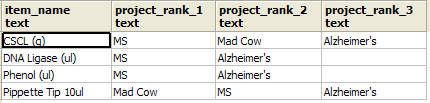
For example if you wanted to know for each item, which projects has it been used most in and you want the column order of projects to be based on highest usage.
You would have simple labels like item_name, project_rank_1, project_rank_2, project_rank_3
and the actual project names would be displayed in project_rank_1, project_rank_2, project_rank_3 columns.
SELECT projreport.*
	FROM crosstab('SELECT i.item_name::text As row_name,
		if.project::text As bucket,
		if.project::text As bucketvalue
	FROM inventory  i
			LEFT JOIN inventory_flow As if
	ON (i.item_id = if.item_id)
	WHERE if.num_used > 0
GROUP BY i.item_name, if.project
ORDER BY i.item_name, SUM(if.num_used) DESC, if.project')
	As projreport(item_name text, project_rank_1 text, project_rank_2 text,
			project_rank_3 text)
Output of the above looks like:
Tricking crosstab to give you more than one row header column
Recall we said that crosstab requires exactly 3 columns output in the sql source statement. No more and No less.
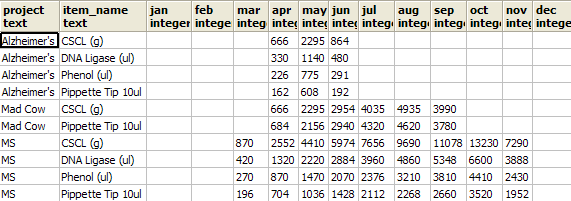
So what do you do when you want your month crosstab by Item, Project, and months columns. One approach is to stuff more than one Item
in the item slot by either using a delimeter or using an Array. We shall show the array approach below.
SELECT mthreport.row_name[1] As project, mthreport.row_name[2] As item_name,
	jan, feb, mar, apr, may, jun, jul, aug, sep, oct, nov, dec
	FROM
	crosstab('SELECT ARRAY[if.project::text, i.item_name::text] As row_name,
		to_char(if.action_date, ''mon'')::text As bucket, SUM(if.num_used)::integer As bucketvalue
	FROM inventory As i INNER JOIN inventory_flow As if
		ON i.item_id = if.item_id
	  AND action_date BETWEEN date ''2007-01-01'' and date ''2007-12-31 23:59''
	  WHERE if.num_used <> 0
	GROUP BY if.project, i.item_name, to_char(if.action_date, ''mon''),
		date_part(''month'', if.action_date)
	ORDER BY if.project, i.item_name',
	'SELECT to_char(date ''2007-01-01'' + (n || '' month'')::interval, ''mon'') As short_mname
		FROM generate_series(0,11) n')
		As mthreport(row_name text[], jan integer, feb integer, mar integer,
			apr integer, may integer, jun integer, jul integer,
			aug integer, sep integer, oct integer, nov integer,
			dec integer)
Result of the above looks as follows:
Building your own custom crosstab function
If month tabulations are something you do often, you will quickly become tired of writing out all the months.
One way to get around this inconvenience - is to define a type and crosstab alias that returns the well-defined type
something like below:
CREATE TYPE tablefunc_crosstab_monthint AS
   (row_name text[],jan integer, feb integer, mar integer,
	apr integer, may integer, jun integer, jul integer,
	aug integer, sep integer, oct integer, nov integer,
	dec integer);

CREATE OR REPLACE FUNCTION crosstabmonthint(text, text)
  RETURNS SETOF tablefunc_crosstab_monthint AS
'$libdir/tablefunc', 'crosstab_hash'
  LANGUAGE 'c' STABLE STRICT;
Then you can write the above query as
SELECT mthreport.row_name[1] As project, mthreport.row_name[2] As item_name,
	jan, feb, mar, apr, may, jun, jul, aug, sep, oct, nov, dec
	FROM
	crosstabmonthint('SELECT ARRAY[if.project::text, i.item_name::text] As row_name, to_char(if.action_date, ''mon'')::text As bucket,
SUM(if.num_used)::integer As bucketvalue
	FROM inventory As i INNER JOIN inventory_flow As if
		ON i.item_id = if.item_id
	  AND action_date BETWEEN date ''2007-01-01'' and date ''2007-12-31 23:59''
	  WHERE if.num_used <> 0
	GROUP BY if.project, i.item_name, to_char(if.action_date, ''mon''), date_part(''month'', if.action_date)
	ORDER BY if.project, i.item_name',
	'SELECT to_char(date ''2007-01-01'' + (n || '' month'')::interval, ''mon'') As short_mname
		FROM generate_series(0,11) n')
		As mthreport;
Adding a Total column to the crosstab query
Adding a total column to a crosstab query using crosstab function is a bit tricky. Recall we said the source sql should have exactly
3 columns (row header, bucket, bucketvalue). Well that wasn't entirely accurate. The crosstab(source_sql, category_sql) variant of the function
allows for a source that has columns row_header, extraneous columns, bucket, bucketvalue.
Don't get extraneous columns confused with row headers. They are not the same and if you try to use it as we did for creating multi row columns, you will
be leaving out data. For simplicity here is a fast rule to remember.
Extraneous column values must be exactly the same for source rows that have the same row header and they get inserted right before the bucket columns.
We shall use this fact to produce a total column.
--This we use for our source sql
 SELECT i.item_name::text As row_name,
 	(SELECT SUM(sif.num_used)
		FROM inventory_flow sif
			WHERE action_date BETWEEN date '2007-01-01' and date '2007-12-31 23:59'
				AND sif.item_id = i.item_id)::integer As total,
				to_char(if.action_date, 'mon')::text As bucket,
 		SUM(if.num_used)::integer As bucketvalue
	FROM inventory As i INNER JOIN inventory_flow As if
		ON i.item_id = if.item_id
	WHERE (if.num_used <> 0 AND if.num_used IS NOT NULL)
	  AND action_date BETWEEN date '2007-01-01' and date '2007-12-31 23:59'
	GROUP BY i.item_name, total, to_char(if.action_date, 'mon'), date_part('month', if.action_date)
	ORDER BY i.item_name, date_part('month', if.action_date);

--This we use for our category sql
SELECT to_char(date '2007-01-01' + (n || ' month')::interval, 'mon') As short_mname
		FROM generate_series(0,11) n;

--Now our cross tabulation query
SELECT mthreport.*
	FROM crosstab('SELECT i.item_name::text As row_name,
	(SELECT SUM(sif.num_used)
		FROM inventory_flow sif
			WHERE action_date BETWEEN date ''2007-01-01'' and date ''2007-12-31 23:59''
				AND sif.item_id = i.item_id)::integer As total,
		to_char(if.action_date, ''mon'')::text As bucket,
		SUM(if.num_used)::integer As bucketvalue
	FROM inventory As i INNER JOIN inventory_flow As if
		ON i.item_id = if.item_id
	WHERE (if.num_used <> 0 AND if.num_used IS NOT NULL)
	  AND action_date BETWEEN date ''2007-01-01'' and date ''2007-12-31 23:59''
	GROUP BY i.item_name, total, to_char(if.action_date, ''mon''), date_part(''month'', if.action_date)
	ORDER BY i.item_name, date_part(''month'', if.action_date)',
	'SELECT to_char(date ''2007-01-01'' + (n || '' month'')::interval, ''mon'') As short_mname
		FROM generate_series(0,11) n'
	)
		As mthreport(item_name text, total integer, jan integer, feb integer,
			mar integer, apr integer,
			may integer, jun integer, jul integer, aug integer,
			sep integer, oct integer, nov integer, dec integer)
Resulting output of our cross tabulation with total column looks like this:

If per chance you wanted to have a total row as well you could do it with a union query in your source sql. Unfotunately PostgreSQL does not
support windowing functions that would make the row total not require a union. We'll leave that one as an exercise to figure out.
Another not so obvious observation. You can define a type that say returns 20 bucket columns, but your actual
crosstab need not return up to 20 buckets. It can return less and whatever buckets that are not specified will be left blank.
With that in mind, you can create a generic type that returns generic names and then in your application code - set the heading based
on the category source. Also if you have fewer buckets in your type definition than what is returned, the right most buckets are just left off.
This allows you to do things like list the top 5 colors of a garment etc.


